TeamViewer Alternative
Limited-time offer

Looking for a TeamViewer Alternative?
Switch Today for $1!

TSplus Remote Support gives your team attended and unattended access, session recording, file transfer and team management. All the features that matter, for just $1/month for 12 months.

$50+ /mo elsewhere
$1 /month for 12 months
Full product, all features included
Secure encrypted sessions
Unlimited devices and users
Up and running in minutes
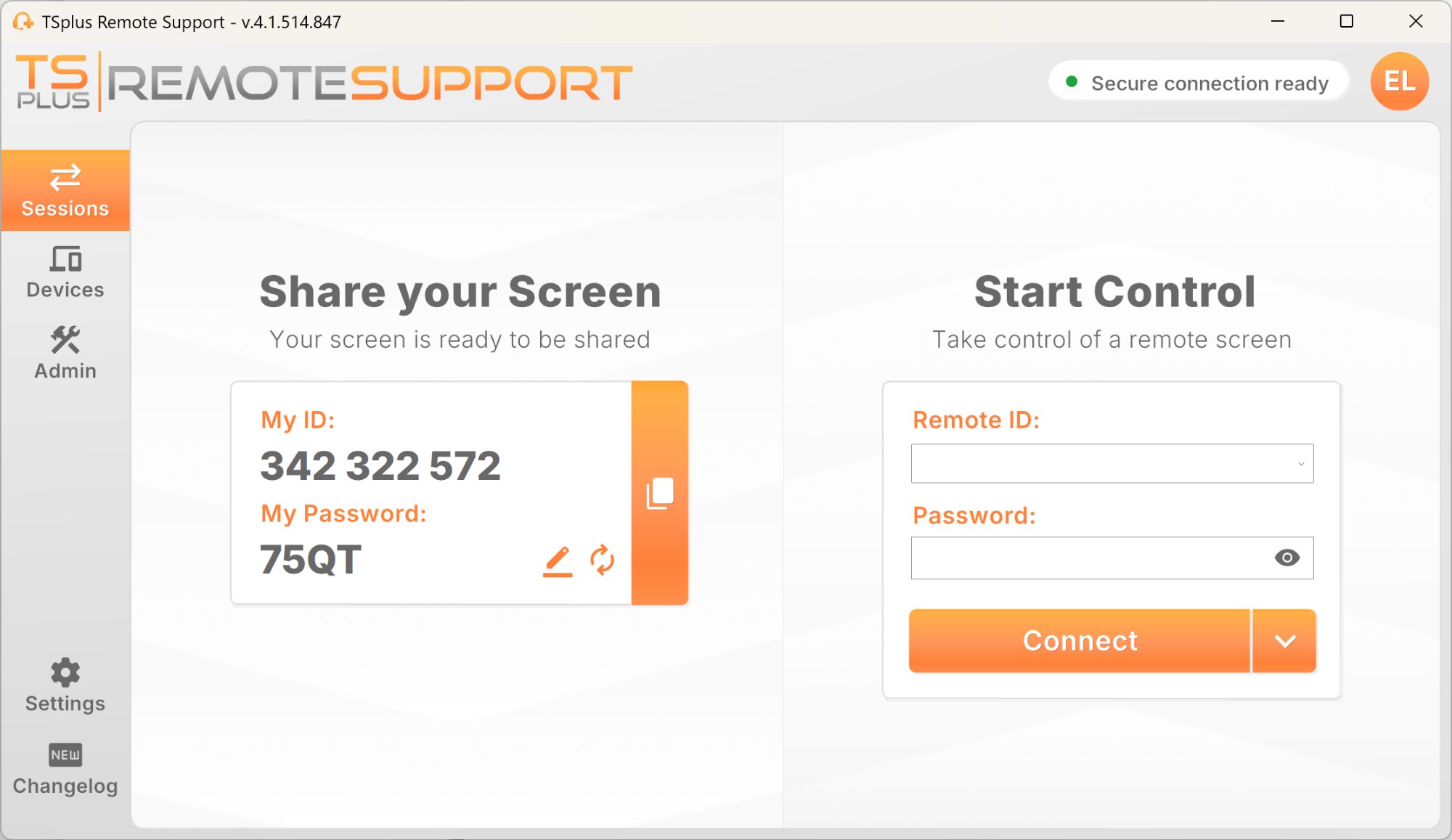
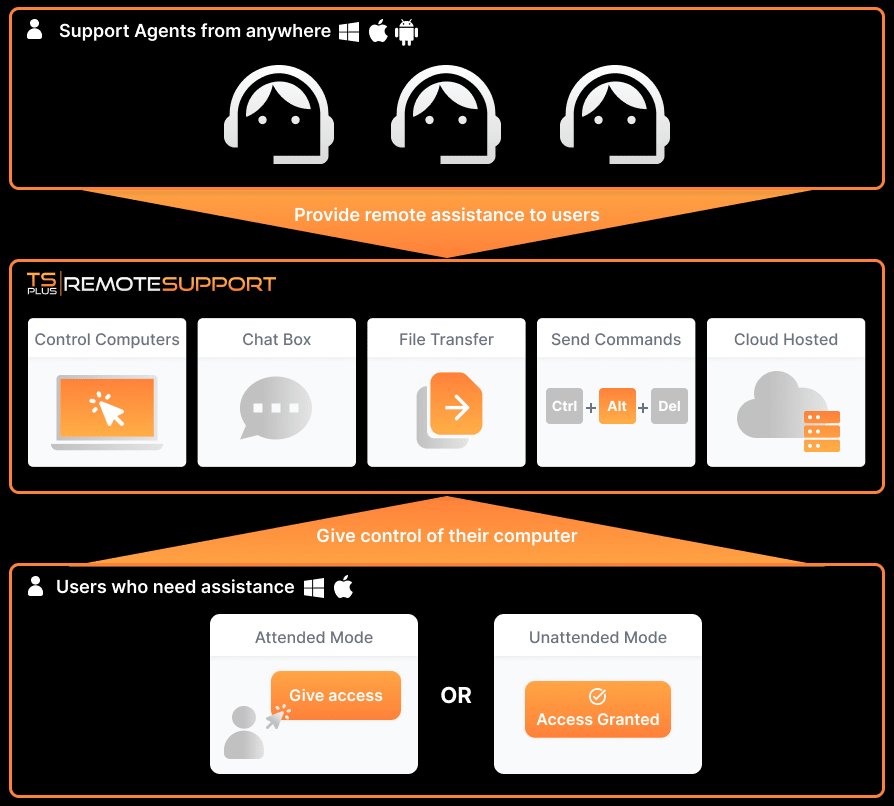
TSplus Remote Support session screen How TSplus Remote Support works
500,000+ companies worldwide
★★★★★ 4.8/5 on G2
★★★★★ 4.7/5 on Trustpilot
140+ countries
Up and running in minutes
Established vendor, 20+ years

Why businesses look for a TeamViewer alternative

Sometimes the issue is not the product itself. It is the fit, the pricing, or the level of complexity your team actually needs.

  • Costs that rise quickly

    As teams grow, pricing can become harder to justify, especially if you only need core support features.

  • More complexity than you really need

    Many support teams want a fast, dependable tool they can deploy easily and use every day without friction.

  • Limited control over branding

    MSPs and software vendors often want the support experience to match their own brand, not someone else's.

  • Stricter infrastructure requirements

    Some organisations need more control over how remote support is deployed, including self-hosted options.

TSplus Remote Support gives you the essentials, done well

  • Attended and unattended remote access
  • Fast session start with no complicated setup
  • Chat, file transfer, screenshots and session recording
  • Multi-monitor support and UAC screen capture
  • Team, folder and permission management
  • Freshdesk integration
  • Custom branding and white-label support client
  • Optional self-hosted deployment

How TSplus compares as a TeamViewer alternative

A practical feature set for support teams that want simplicity, flexibility and predictable pricing.

Capability TSplus Remote Support TeamViewer AnyDesk
Attended remote control
Unattended remote access
Session recording ~
File transfer
UAC / elevation capture ~
Multi-monitor support
Team and permission management ~
Custom branding / white-label options ~ ~
Helpdesk integration (Freshdesk) ~
Self-hosted deployment option
Concurrent-connection pricing ~
$1/month switch offer

✓ Included  ·  ~ May depend on plan or edition  ·  ✗ Not available. Indicative comparison based on public product information.

Everything your support team needs.
Nothing they don't.

A focused toolkit built for real support work, not unnecessary complexity.

Attended Remote Control

Help users in real time. The end-user shares an ID and password, and your agent connects in seconds with minimal setup.

Unattended Access

Enable secure unattended access to managed devices with a dedicated password. Reconnect whenever needed, even if no user is present.

In-Session Chat

Communicate directly with the remote user during a live session. Chat history can also support your internal documentation or helpdesk workflow.

File Transfer

Send and receive files during an active session. Useful for updates, patches, logs, documents and quick troubleshooting tasks.

Session Recording

Record sessions for training, internal review or audit needs. You can also capture screenshots during the session when needed.

UAC and Multi-Monitor Support

Handle Windows elevation prompts more easily and switch between multiple screens on the remote device without losing context.

From first contact to resolution in minutes

A simple workflow your team can use confidently every day.

1

User launches the client

The end-user opens the lightweight support client, receives a unique ID and temporary password, and shares them with the agent.

2

Agent connects instantly

The agent enters the ID and password and starts the session. Remote control, command line or unattended access modes are available.

3

Resolve with the right tools

During the session, the agent can chat, transfer files, record, take screenshots, use system tools and review device information.

4

Save, organise and move on

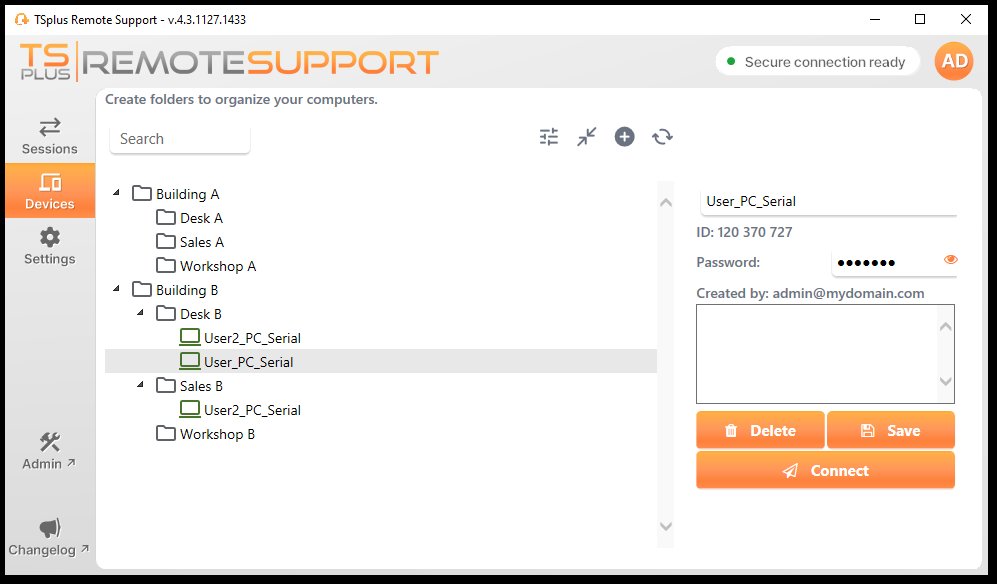
Computers can be saved in folders, sessions can be reviewed, and administrators manage users and permissions from the Admin Console.

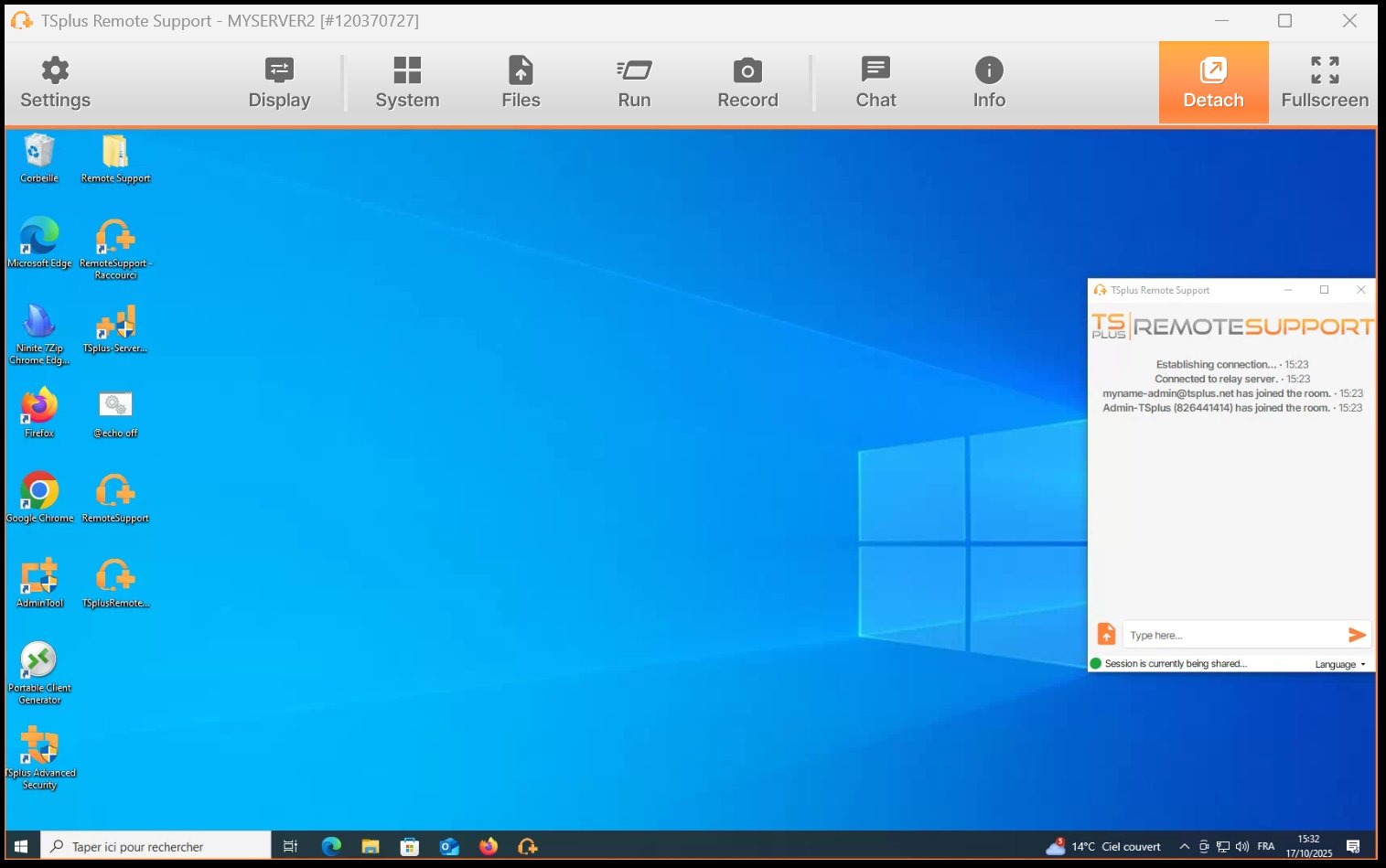
TSplus live remote session with toolbar

Full session toolbar with display, system, files, recording, chat and device information

TSplus device folder management

Organised device folders with quick unattended access

Secure remote support without unnecessary friction

TSplus Remote Support is designed to be straightforward to use while giving teams the controls they need.

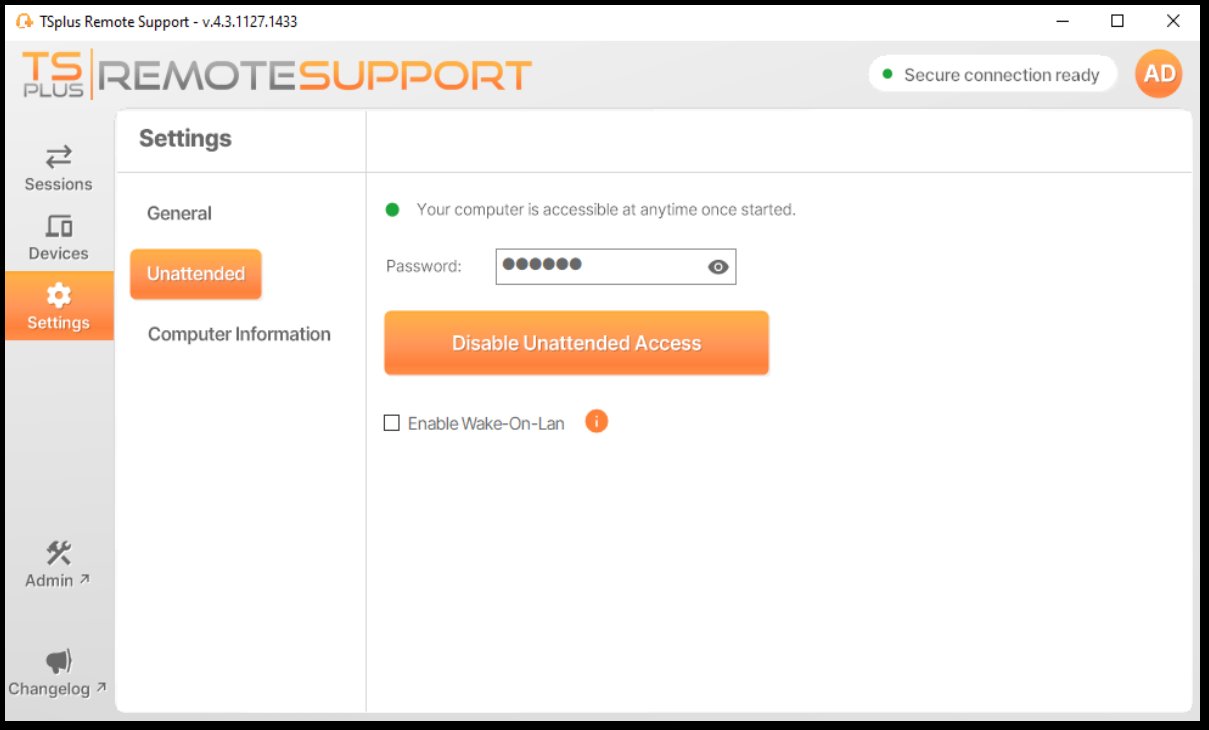
TSplus unattended access settings

Unattended access protected by a dedicated password, with Wake-On-LAN available

Encrypted sessions

Remote support sessions are protected by modern encryption to help keep data private while in transit.

Two-factor authentication

2FA adds another layer of protection for subscription users and helps secure access for agents and administrators.

Team-based permission controls

Assign access rights by team and folder so the right people can access the right devices.

Self-hosted deployment option

For organisations that need more infrastructure control, TSplus Remote Support also offers a self-hosted deployment model.

Dedicated unattended password

Unattended devices are protected with a dedicated password, separate from the password used for attended sessions.

Switch from TeamViewer for just $1/month

For a limited time, get the full TSplus Remote Support product for $1/month for 12 months. Then continue at standard pricing.

Limited-Time Switch Offer: $1/Month for 12 Months

Full product. 1 concurrent connection. Unlimited devices and users. No feature locks.

All features included.
Then from $5 / connection / month.

Your $1/month switch offer includes 1 concurrent connection with every feature unlocked. After 12 months, continue with standard concurrent-connection pricing, starting at $5/connection/month billed annually. Scale up whenever you need.

All features included from day one
$1/month for 12 months
1 concurrent connection
Unlimited devices and users
No per-device fees
MSP and volume options available
just
$1
per month for 12 months
then from $5/connection/month · billed yearly

A TeamViewer alternative for real support teams

Designed for organisations that need reliable remote support without unnecessary overhead.

Internal IT Teams

Support employees on-site or remote, organise devices by department, and give technicians the access they need.

MSPs and IT Service Providers

Manage multiple customer environments from one console and scale concurrent connections as your client base grows.

Software Vendors

Add branded remote support to your own product and create a smoother support experience for end-users.

Customer Support Teams

Link live support sessions to helpdesk activity and keep useful context inside your support workflow.

Make remote support feel like part of your brand

TSplus lets you customise the client experience so your users see your brand first, not a generic third-party tool.

Add your company logo and name to the support client
Generate a portable branded client for end-users
Use Lite mode for a simpler end-user experience
Host the client download from your own domain
Integrate TSplus Remote Support into your own software
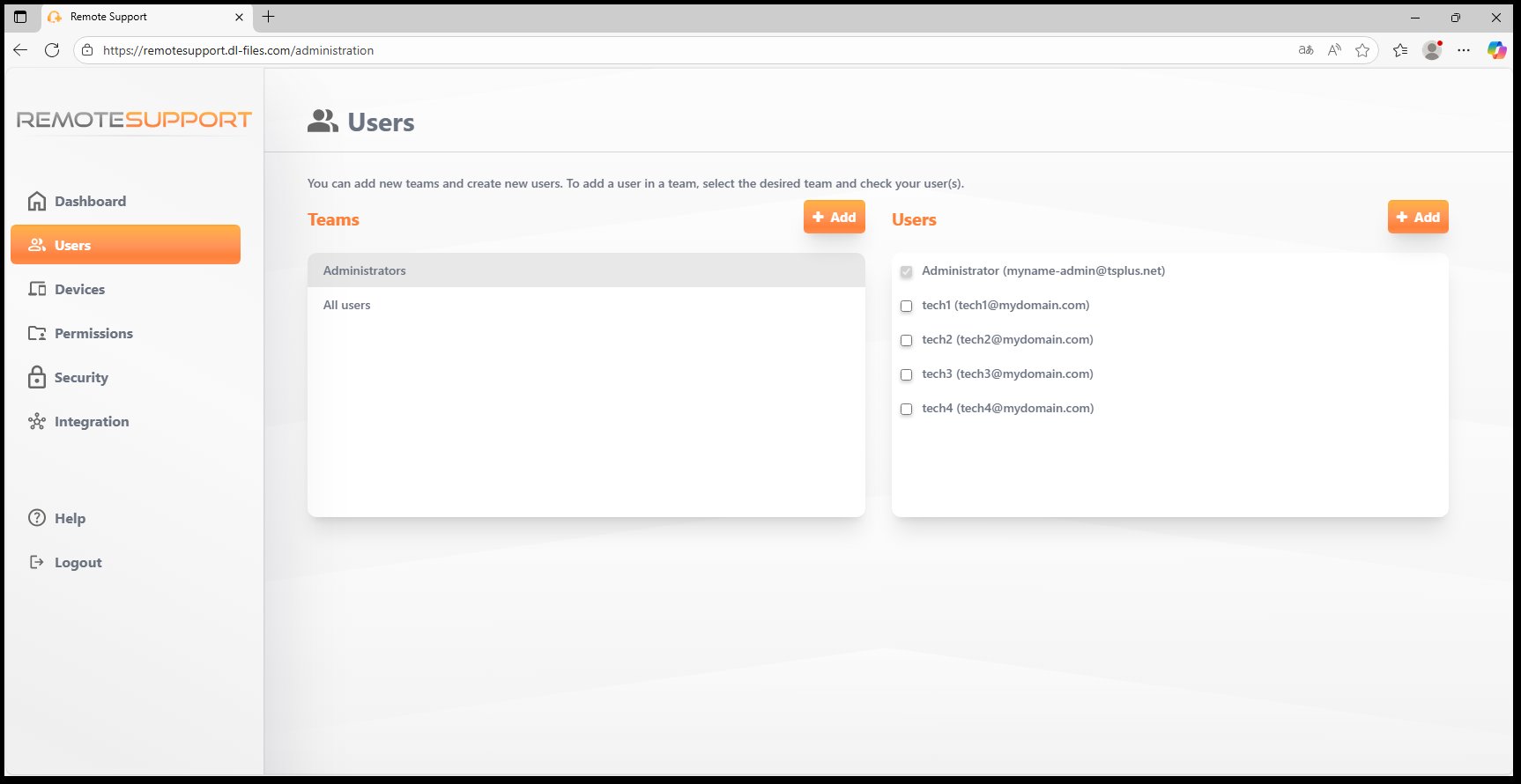
TSplus Admin Console user management

Admin Console with user management, teams, devices, permissions, security and integrations

500,000+ companies trust TSplus worldwide

TSplus is an established remote access and remote support vendor with over 20 years of experience in the field.

★★★★★

"TSplus is incredibly effective, easy to deploy, and fits our budget perfectly. It was really a no-brainer, especially when the majority of our staff began working from home."

Jack RiggenVistability
★★★★★

"The software has been rock solid for two years. Technical support is superb, making TSplus the total solution at an extremely affordable price. The ROI has been outstanding."

Kent CrabtreeMaximus
★★★★★

"We've been using TSplus for 6 years and we are extremely satisfied. Apart from being a great product, we love the after-sales service and support."

Tony AntoniouShortcuts Software

Frequently asked questions

Yes, especially for teams looking for reliable attended and unattended remote support, strong core features, simpler pricing and more control over branding. And with the current switch offer at $1/month for 12 months, there has never been a lower-risk time to try it.
Yes. End-users can enable unattended access from the settings panel and protect the device with a dedicated unattended password. Agents can then save that computer and reconnect later when needed.
Yes. The platform supports multiple users, teams and permission levels. Pricing is based on concurrent connections, meaning the number of agents active at the same time, not the total number of accounts created.
Yes. These are part of the core feature set. Agents can also take screenshots, use system tools, review remote device information and work more efficiently during support sessions.
Yes. TSplus Remote Support includes Freshdesk integration to connect support sessions with ticket workflows and keep useful session context in the helpdesk.
Yes. In addition to the standard hosted model, a self-hosted deployment option is available for organisations that need greater infrastructure control.
For a limited time, you can switch to TSplus Remote Support for just $1/month for 12 months. You get the full product with 1 concurrent connection, unlimited devices and users, and every feature included. After 12 months, you continue at standard pricing. No existing TSplus licence is required.

Ready to leave TeamViewer behind?
Switch to TSplus for $1/month.

Full product. All features included. $1/month for 12 months, then standard pricing. Lower risk than staying where you are.

Limited-time switch offer · $1/month for 12 months, then standard rate · Terms apply